BIM
BIM: Revolutionizing Facility Management
Building Information Modeling (BIM) is the latest technology to offer significant improvement in the speed, cost, and quality of facility planning, design and construction, and operations and maintenance. One eloquent description of BIM is an Intelligent Simulation of Design Intent.
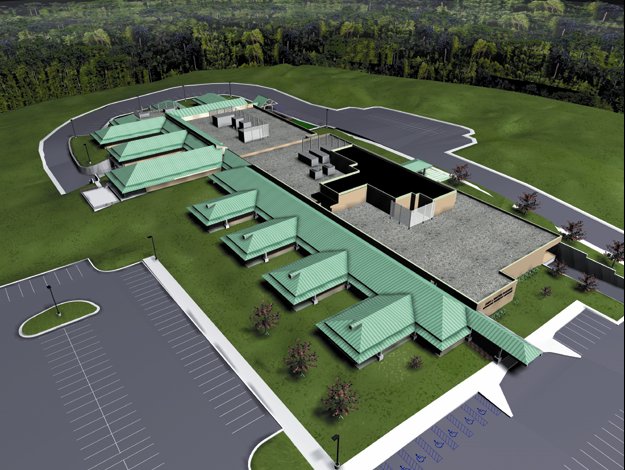
The Power of BIM Interchange
In more practical terms, the potential of BIM stems from its value as an interchange mechanism between the tools used to perform the various functions of the AEC industry (standards) and the ability of computational tools to manipulate the model directly, with or without human intervention (computable). In a typical BIM-enabled process, the data model serves as the principal means for communication between activities and professionals.
Templates & Standards
Explore essential resources and standards for Building Information Modeling (BIM) within USACE, including templates, object libraries, and advanced modeling guidelines designed to ensure consistency, efficiency, and accuracy in project development and execution.
The Purpose
Building Information Modeling (BIM) with the Autodesk Revit Platform offers the ability to easily configure save and deploy a standard working environment. Standardizing on district neutral and project agnostic Revit template will ensure that graphic representations, data syntax, taxonomy and software environment are consistent, and that the end deliverable will satisfy industry and USACE CAD/BIM standards.
The Process
The USACE and Autodesk collaborated to create a BIM Template Team consisting of seasoned CAD/BIM Managers with a working knowledge of Revit. Each member has specific disciplinary strengths and shared a draft working district specific Revit template with the team. Each of the district’s templates were critiqued and tested by the group, and by teams going through BIM Implementations. The feedback was debated and the group decided on revisions and enhancements that supported the intent, purpose and general needs of the USACE.
The Payoff
The upfront time and effort required to set up, configure, and coordinate a Revit project and environment can be minimized significantly by deploying a Revit template file (.rte). Revit templates will increase graphic and non graphic consistency across teams, districts and divisions. Templates will provide a team with a common starting point and will improve the overall USACE product and brand.
Downloads
- BASE – a template built from the Revit Out-of-the-Box template that has A/E/C compliant symbols, bordersheets and views but with all discipline specific information excluded.
- ARCH – a template built from the USACE BASE template but with Architectural discipline symbols, information included.
- A template built from the USACE BASE template but with discipline specific symbols, information included
- BASE – a template built from the Revit Out-of-the-Box template that has A/E/C compliant symbols, bordersheets and views but with all discipline specific information excluded.
- ARCH – a template built from the USACE BASE template but with Architectural discipline symbols, information included.
- A template built from the USACE BASE template but with discipline specific symbols, information included
The Purpose
Virtual Modeling in the civil works environment is critical for the success of projects. Civil Information Modeling (CIM) is a process that allows users to directly link existing information into a design model and more accurately represent the project and provide analytical feedback for the design.
The Process
A properly prepared template assists the designers with the processes of incorporating existing data (LIDAR, survey, maps, CAD files, imagery), developing the design, and creating construction documentation. From the initial survey to the project layout to the final design and documentation it will save time and effort by having standards built up to meet current national CAD standards.
The Payoff
A project’s documentation will be consistent and will flow out of the design process instead of being a complete separate process. This allows changes to occur without introducing major risk of errors through human duplication of data. Multiple types of data can be incorporated together and used in the design analysis. Special adaptions of the data can be made quickly because the standard settings are in place and can be copied and modified on the fly.
Downloads
- Template Set with Documentation – Imperial and Metric – Download Complete Templates
- Imperial and Metric – Download documentation only
- Civil design and planning terms used in the software.
- Overview Presentation
- Access to this material requires a USACE Common Access Card (CAC).
- AutoCAD Civil 3D Workstation Standards Setup Guide
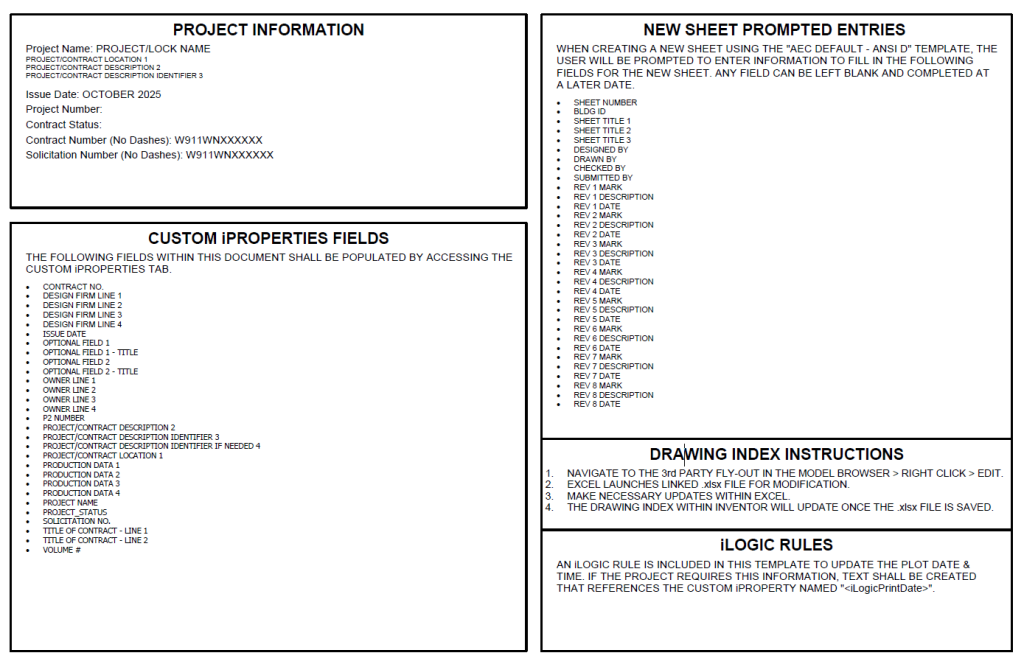
The USACE Autodesk Inventor Templates include:
- Compressed File DOWNLOAD
- Current materials installation recommended for people experienced users with Inventor Template setup experience
- Documentation and instruction material will be released later
The USACE BIM Object Library (UBOL) is a catalog of BIM objects that were submitted to the CAD/BIM Technology Center by various USACE districts. The intent is that this library consist of generic objects; therefore, manufacture specific objects weren’t included in this resource. The purpose of the UBOL is to act as a tool for USACE team members to be able to review the information within each BIM object. The objects can also be downloaded so that team members can see how a particular object functions in a project environment. As the information within each BIM object is updated and standardized, then this tool can be utilized by USACE team members to review those changes.
The Purpose
Building Information Modeling (BIM) and Civil Information Modeling (CIM) enable more effective design and construction. BIM and CIM models is composed of objects that not only graphically represent real world objects (walls, doors, windows, levees, roads, channels…) but provide data about the objects that can be used for scheduling, quantification and design analysis. A critical component of these capabilities is to have consistent objects in the model. The ability to control the data for these objects is critical to the extended capabilities of the modeling. Beyond standard document schedules, the data can assist with cost estimates (quantity take off) and creating specifications.
The Process
The Advanced Modeling Object Standard (AMOS) and the Advanced Modeling Object Standard Technical Requirements (AMOS-TR) will provide a consistent structure for modeling Objects. Currently there are many thousands of objects that exist for BIM and many that exist for CIM. But there are inconsistencies between the object data that create problems for the BIM or CIM. Some Objects are modeled to an unnecessary high degree of detail such as toilets that have very complex geometry (only needed for manufacturing). Many objects have large amounts of data needed by the manufacturer for a specific product but will not be useful for the design documentation required for construction contracts.
The Payoff
Creating standards for the creation of BIM and CIM Objects allows more consistency between the objects and reduces the complexity of working with the models. It also gives the Object creators direction and limits for more effective modeling. Controlling the data requirements can allow the Objects to be used for creating schedules or automating processes (quantity takeoff or specifications) that can reduce workflow and reduce human error.
Maintaining standards for Objects in a library allows the Objects to be searched for much more efficiently. The AMOS provides flexibility for the BIM or CIM designer to select Objects based on multiple categories- graphics, data, function or extension.
Documents
BIM Implementation
In more practical terms, the potential of BIM stems from its value as an interchange mechanism between the tools used to perform the various functions of the AEC industry (standards) and the ability of computational tools to manipulate the model directly, with or without human intervention (computable). In a typical BIM-enabled process, the data model serves as the principal means for communication between activities and professionals.
The objective of this work was to outline the strategic and implementation plans for using BIM technology to improve the planning, design, and construction processes of the U.S. Army Corps of Engineers. This document describes how USACE will smoothly meet the vision of our Department of the Army (DA) proponents, including the Office of the Secretary of Defense (OSD), the Army, and the Air Force.
Documents
The architecture, engineering, and construction industries are pursuing process and technological innovations to save time and money to enhances the quality of projects through the design, construction and handover phases. Building Information Modeling (BIM) is a new technology designed to improve this process. ERDC conducted research to study the benefits of BIM throughout the life-cycle process. The BIM Primer documents innovations needed to quickly capture and deliver real time building information.
Documents
A Computer-Aided Virtual Environment (CAVE) is an excellent tool for viewing and analyzing a BIM model. Like the holodeck on “Star Trek”, it allows the user to enter an immersive environment for viewing the BIM model. However, most Department of Defense sites do not have the funding or space required for this technology. This white paper, developed by Bentley Systems, Inc. for the CAD/BIM Technology Center, discusses potential economical/space-saving means for creating a comparable “CAVE-Lite” environment.
ITL team members worked with HQUSACE Construction Management leadership and Visbox to support transition and demonstration of a VisCube M4 CAVE. The visualization space provides localized, state-of-the-art training that aids mission efforts, design reviews, and contractor coordination. The installation will improve project delivery, provide risk mitigation, and enhance cost reduction measures and will also serve as a benchmark for USACE districts in elevated construction and design processes.
Documents
Project Management
In more practical terms, the potential of BIM stems from its value as an interchange mechanism between the tools used to perform the various functions of the AEC industry (standards) and the ability of computational tools to manipulate the model directly, with or without human intervention (computable). In a typical BIM-enabled process, the data model serves as the principal means for communication between activities and professionals.
The A/E/C Workspace is a common environment that can be used across agencies and engineering applications. This environment contains folder structures, tools, and resource files that implement the A/E/C CAD Standard and the A/E/C Graphics Standard documents. By utilizing one environment across agencies and applications it will give greater consistency when delivering A/E/C Standards-compliant deliverables.
Bentley A/E/C Workspace - 4.0.40 (CONNECT)
The WorkSpace was developed with the following Bentley Software Products and Versions:
- OpenBuildings Version 10.09.02.36 ONLY*
- ProStructures Version 10.07.01.59 ONLY*
- MicroStation Version 10.17.02.61 (or newer)
- OpenRoads Designer Version 10.12.01.59 – 10.12.03.02 (* prior versions of these products will need to be uninstalled prior to installation of the Workspace. The Workspace will not work if multiple versions of these products are installed on the same machine)
Downloads
Workspace Version 4.0.40 changes/additions
- OpenBuildings and ProStructures can now be installed on the same computer and are certified to run on this new workspace version.
- Configuration and folder reorganization for a more logical approach
- Added new Military Civil Cells
- Added support for the new Civil Labeler tool
- Added several enhancements regarding sheets production
- Added support for earthwork end area tables on cross sections
- Numerous other defect fixes and enhancements.
- OpenBuildings and ProStructures can now be installed on the same computer and are certified to run on this new workspace version.
- Configuration and folder reorganization for a more logical approach
- Added new Military Civil Cells
- Added support for the new Civil Labeler tool
USACE Workspace 4.0.40 Local Workspace Installation
A guide to properly install the AEC Bentley CONNECT Edition Workspace (Workspace 4.0.40) locally to enhance your CAD/BIM application capabilities and maintain A/E/C standards compliance for consistent and efficient project delivery across all agencies.
Submit your content to the USACE BIM Object Library (UBOL) by completing the submission form, packaging all files into a single zip, and uploading them via the provided link. Make sure your files are clearly named to align with their respective groups.
Submission Process
- Complete the USACE BIM Object Library (UBOL) content submission form.
- Each Family-Object Classification of Components document should be appropriately named to clearly indicate pairing with the intended group of content being submitted.
- All groups of content and the supporting documentation should be uploaded within a single zip file.
- All groups of content and the supporting documentation should be submitted via the upload page.
USACE is excited to announce the latest release of the contract requirements which now integrate BIM, CIM, GIS, and CAD requirements into one.
The new term “Advanced Modeling” is the umbrella term that refers all or any of BIM, CIM, GIS, and CAD technologies. USACE continues to invest in Advanced Modeling and is working harder than ever to ensure that the benefits of virtual planning, design, construction, and operations are being realized holistically.
In this release, the big changes include:
- Changed from “Attachment F” format to integrate with the standard 3-part Unified Facilities Guide Specifications.
- Changed the “BIM PxP Template” to an “Advanced Modeling PxP Template” to integrate the Advanced Modeling requirements.
- Incorporation of standard UFGS submittals, submittal designations, and submittal procedures to address significant variability in how and when content was delivered.
- Inclusion of requirement for the USACE Advanced Modeling Submittal Review Checklist and Guide. Version 2 of the Checklist now incorporates checks for compliance with the A/E/C CAD and Graphics Standards.
- Incorporation of GIS requirements and deliverables.
- Use of the term Civil Information Modeling (CIM) to refer to tools such as Autodesk Civil3D and Bentley Systems InRoads.
- Addition of Government Furnished Material (GFM) conditions for cases where GFM must be provided.
- Addition of reference to NCS v6 “BIM Implementation” to move towards more industry standard BIM quality requirements.
- Provide option to omit CAD export from BIM if not a customer desired option.
- Differentiation of requirements for CAD content produced by BIM versus content produced in CAD natively.
- Establishment of unified Coordinate System requirements.
or more information on the USACE Advanced Modeling Contract Language, the PxP and the M3 documents, please contact Steve Hutsell or Van Woods.
For more information on the CHX, CHX Guide and the PxP CHX documents, please contact Justin Jameson or Steve Hutsell.
If prior versions are needed, please see the Document Center.
Directives and Contract Specifications
- Engineering and Construction Bulletin, ECB 2018-7, Aug 2022
- Engineering and Construction Bulletin, ECB 2017-22
- Unified Facilities Guide Specification (UFGS) 01 33 16.00 10, May 2016
Submittal Review Checklist (CHX) and Guide
Project Execution Plan (PxP)
Minimum Modeling Matrix (M3)
- See below for associated M3 Resource files